 MacMotion
You don’t need a gym, a mat or a change of clothes to exercise during the workday. Every exercise below uses your own body weight, and most take less than a minute. The rep targets are the starting points MacMotion uses. Do fewer if you need to, more as you get stronger.
How to use this list
- One exercise per break. Every 30 minutes or so, stand up and do one set. By the end of the day that adds up to real training.
- Or a two-minute routine. Chain three exercises (see the routines below) once or twice a day.
- Match the moment. In a shared office or between calls, use the desk exercises. At home with a bit of space, the standing and floor exercises get your heart rate up.
Why such short sessions? Because frequent short breaks interrupt long stretches of sitting, which is linked to better blood sugar control 1, and brief bursts of vigorous activity are linked with lower mortality risk 2. More in why two-minute workouts count.
At your desk (7 exercises)
No floor needed, fine in work clothes, and quiet enough for an office.
Desk stretch
- At your desk
- 60-second routine
- Neck, shoulders, upper back
A seated reset for when you can’t stand up: six gentle moves, about 10 seconds each.
- Roll your shoulders back slowly
- Tilt your head to the left, breathe; then to the right
- Interlace your fingers and reach to the ceiling
- Twist gently to the left, then to the right
Camera setup in MacMotion: Sit facing your Mac so your head, shoulders and hands are in view.
Arm raises
- At your desk
- 12 reps
- Shoulders, upper back
The easiest way to get blood moving without leaving your chair.
- Sit or stand tall
- Raise both arms all the way overhead
- Lower them slowly to your sides
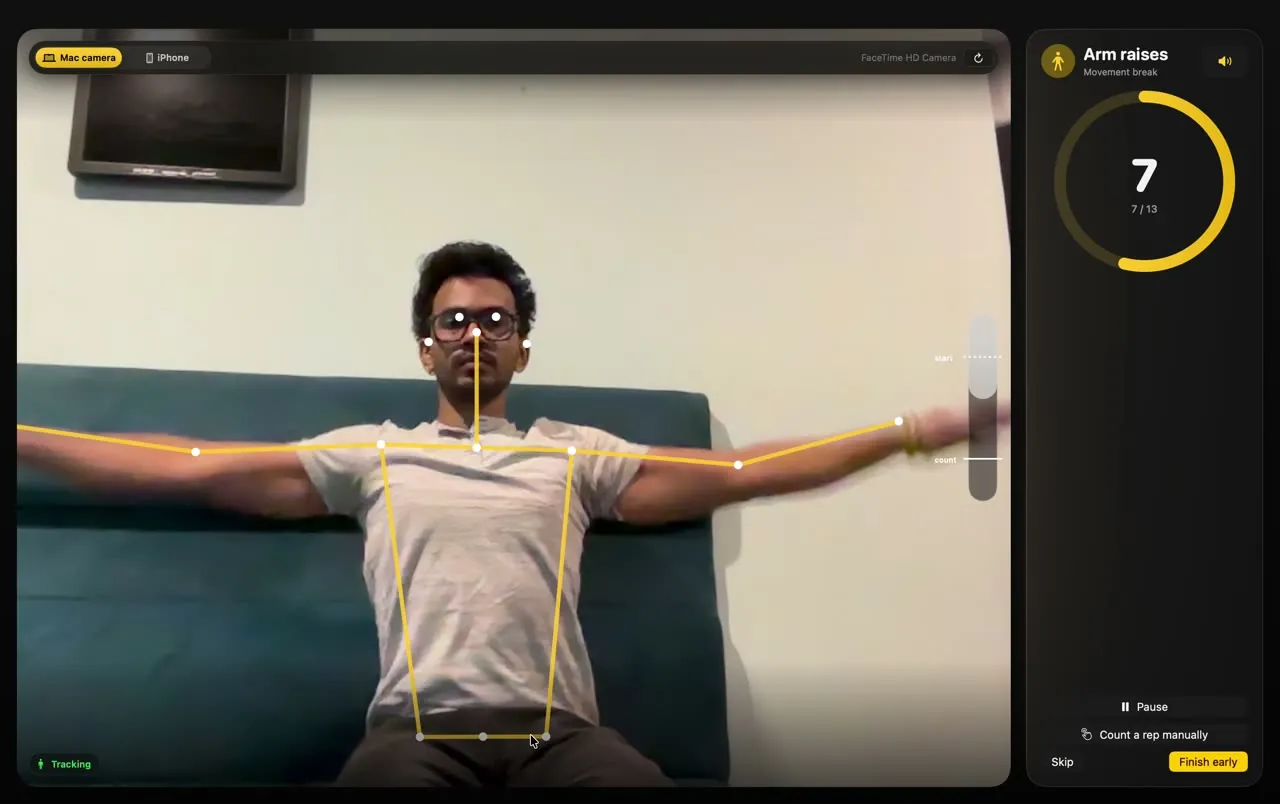
Camera setup in MacMotion: Sit or stand facing your Mac so your head, shoulders and hands are in view.
Chair squats
- At your desk
- 10 reps
- Legs, glutes
A squat with a safety net: your chair tells you how low to go.
- Stand in front of a sturdy chair, feet hip-width
- Sit down lightly, don’t flop
- Stand all the way up, squeezing your glutes
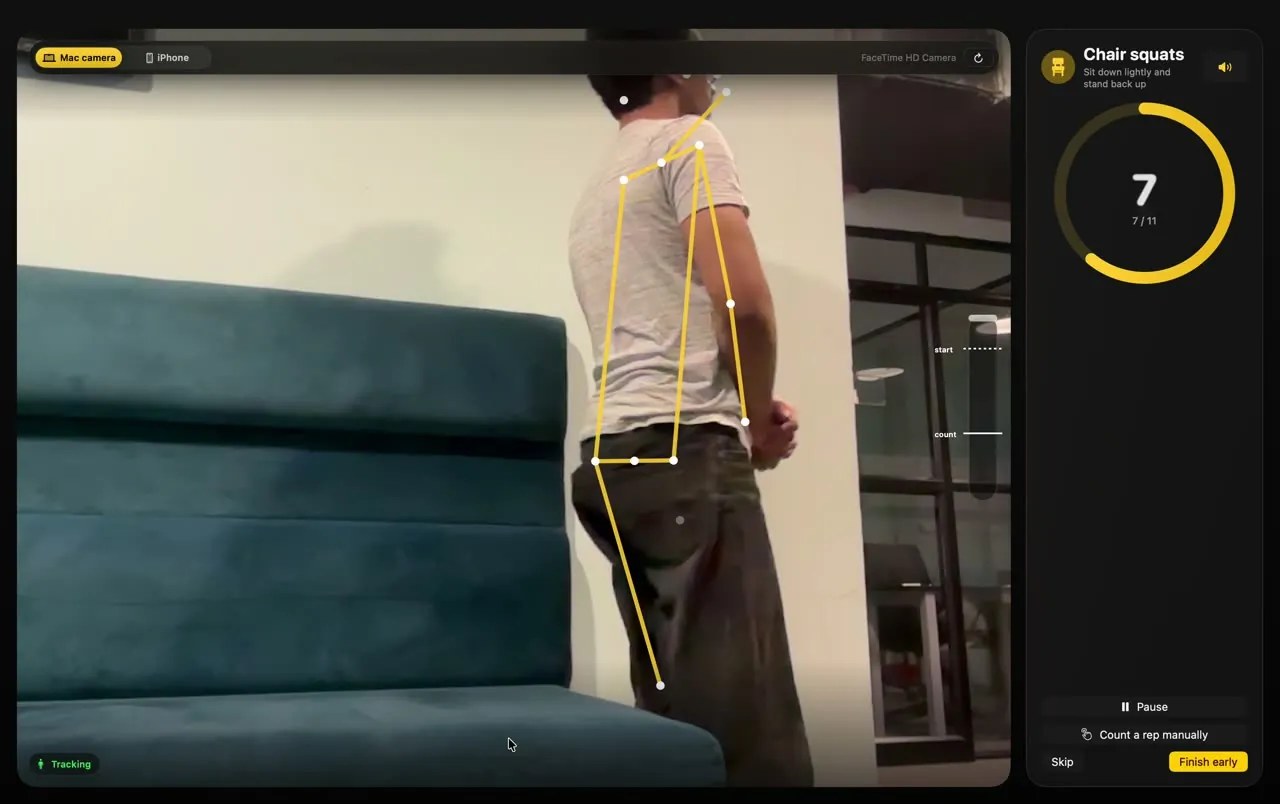
Camera setup in MacMotion: Put a chair 2 m from your Mac and stand in front of it, side-on, so hips and knees are in view.
Wall push-ups
- At your desk
- 12 reps
- Chest, shoulders, arms
Push-ups against a wall: gentle on wrists and shoulders, and fine in work clothes.
- Hands on the wall at shoulder height, feet a big step back
- Lean in until your chest nearly touches the wall; your hands take the weight
- Push back until your arms are straight
Camera setup in MacMotion: Stand side-on to your Mac, about 2 m away, with your whole body in view.
Chair push-ups
- At your desk
- 10 reps
- Chest, arms, core
A step up from wall push-ups. Use a chair that can’t roll or slide.
- Push a sturdy chair against a wall, hands on the edge of the seat, feet walked back
- Legs straight, body in one line; lower your chest toward the seat
- Push back up until your arms are straight
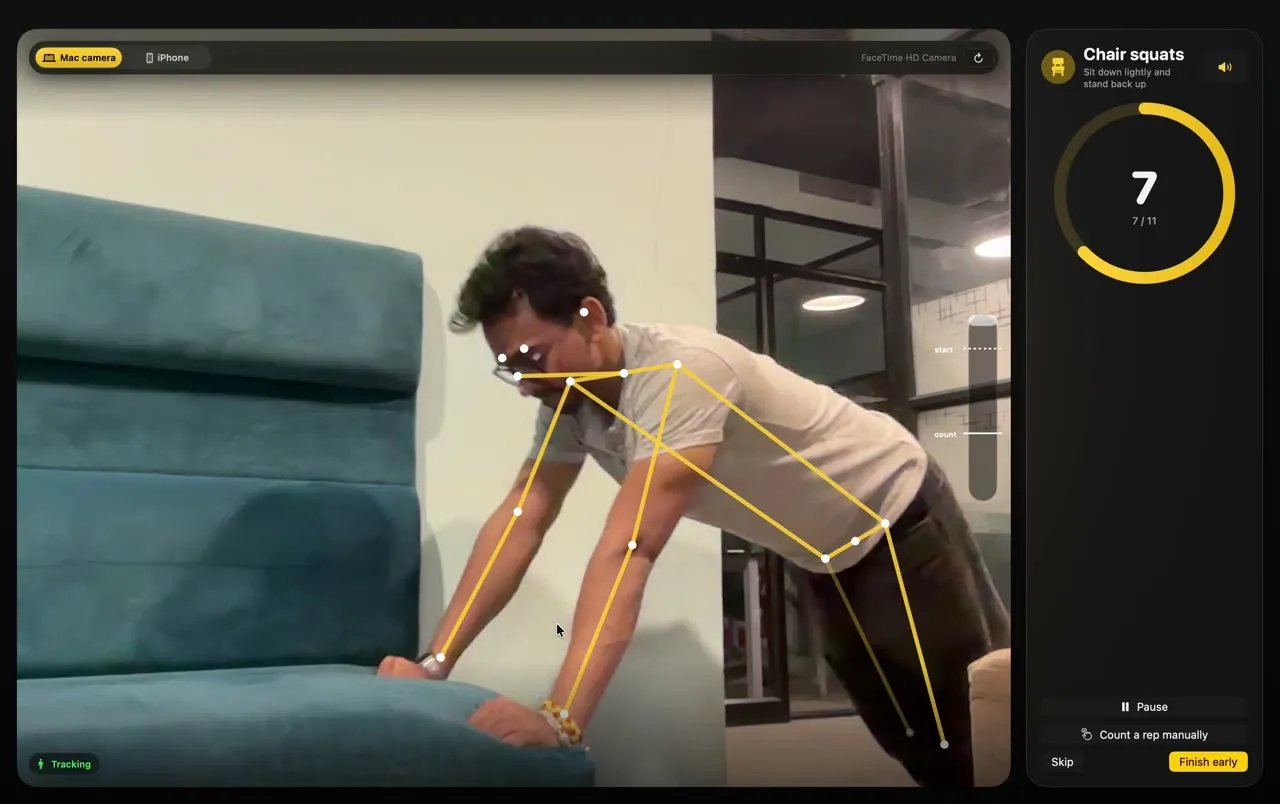
Camera setup in MacMotion: Side-on to your Mac, about 2 m away, whole body in view.
Side bends
- At your desk
- 12 reps
- Sides of your waist, back
Opens up the sides of your body after hours of leaning toward a screen.
- Stand tall, one arm reaching up over your head
- Bend your whole upper body to the other side, not just the arm
- Back to the middle, switch arms and lean the other way
Camera setup in MacMotion: Stand facing your Mac, about 2 m back, so your hips and raised hand stay in view.
Good mornings
- At your desk
- 12 reps
- Hamstrings, glutes, lower back
A hip hinge that works the back of your body, the part that sitting switches off.
- Hands behind your head, feet hip-width, knees soft
- Brace your core and hinge at the hips until your back is nearly flat, pause
- Slowly lift back up to standing
Camera setup in MacMotion: Stand side-on to your Mac, 2–3 m away, whole body in view.
Standing (6 exercises)
You’ll need a couple of metres of space. These get your legs and heart working.
Squats
- Standing
- 15 reps
- Legs, glutes
The classic. The biggest muscles in your body, in two minutes.
- Feet shoulder-width, toes slightly out
- Both feet flat; sit back until your thighs are about level with the floor
- Stand tall at the top, knees over toes
Camera setup in MacMotion: Stand 2–3 m from your Mac so your feet are in view. Side-on works best.
Jumping jacks
- Standing
- 25 reps
- Full body, heart rate
The fastest way to get out of breath at home. Skip it if you have neighbours below at 7 AM.
- Start with feet together, arms down
- Jump your feet wide and bring your arms overhead
- Jump back to the start
Camera setup in MacMotion: Face your Mac from 2–3 m away so your whole body, feet included, is in view.
Lunges
- Standing
- 12 reps
- Legs, glutes, balance
One leg at a time, so it’s harder than it looks.
- Step forward and drop the back knee toward the floor
- Keep the front knee above the ankle
- Push back up to standing
Camera setup in MacMotion: Stand 2–3 m from your Mac so your feet are in view. Side-on works best.
High knees
- Standing
- 30 reps
- Hips, heart rate
Running on the spot. Great for a quick burst of effort.
- Face the camera
- Drive each knee up to hip height
- Stay light on your feet
Camera setup in MacMotion: Face your Mac from 2–3 m away so your whole body is in view.
Wall sit
- Standing
- 30-second hold
- Thighs
An invisible chair. Quiet, simple and surprisingly hard.
- Stand with your back flat against a wall, feet a step out from it
- Slide down until your thighs are level
- Hold and breathe
Camera setup in MacMotion: Side-on to your Mac, about 2 m away, so hips, knees and feet are in view.
Single-leg deadlifts
- Standing
- 10 reps (5 each leg)
- Hamstrings, glutes, balance
Works balance and the back of your legs at the same time.
- Stand on one leg, knee softly bent
- Tip forward as the other leg lifts behind you, reaching for your shin
- Stand back up; switch legs halfway through
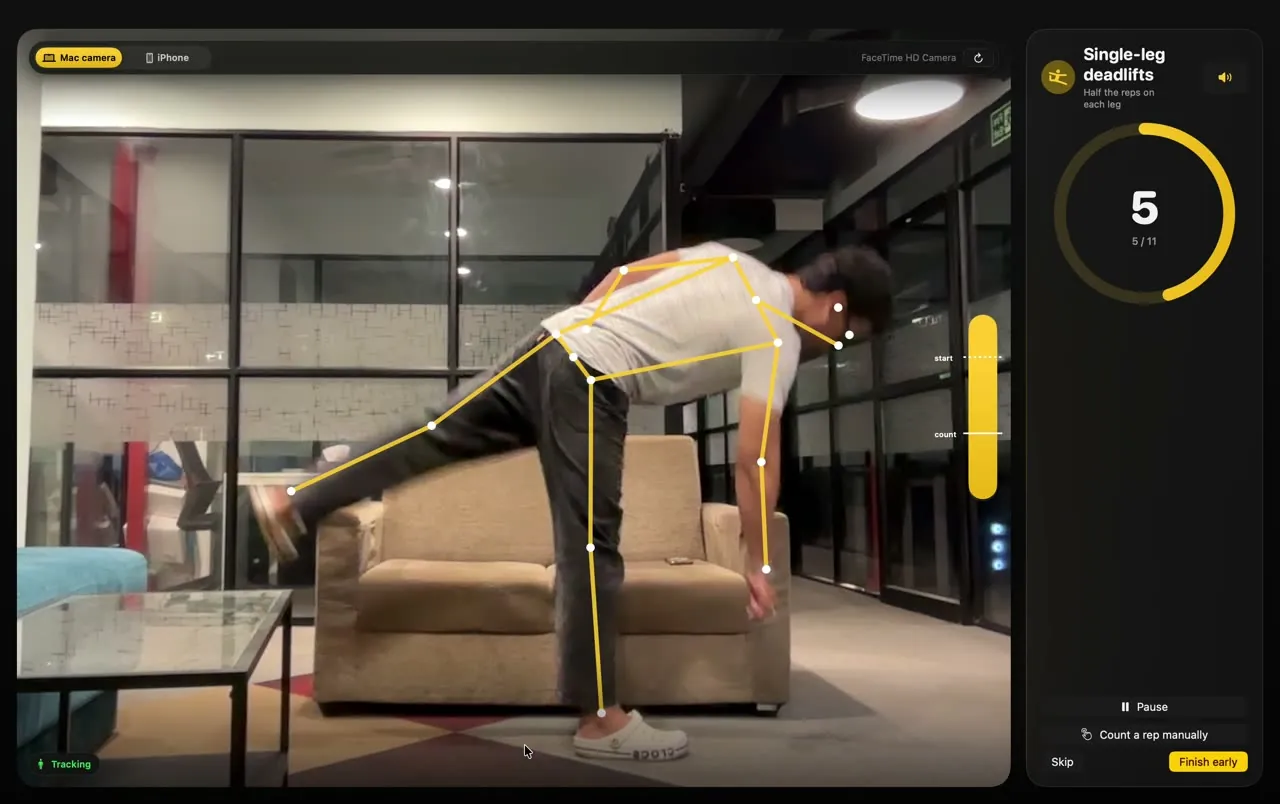
Camera setup in MacMotion: Stand side-on to your Mac, 2–3 m away, whole body in view.
On the floor (9 exercises)
Best at home. A rug or mat makes these more comfortable.
Push-ups
- On the floor
- 10 reps
- Chest, shoulders, arms, core
The best upper-body exercise there is. Too hard today? Do half push-ups instead.
- Hands under shoulders, body in one straight line
- Lower until your chest is a fist above the floor
- Push all the way up, arms straight
Camera setup in MacMotion: Side-on to your Mac, about 2 m away, with your Mac placed low so it sees your whole body.
Half push-ups
- On the floor
- 10 reps
- Chest, shoulders, arms
Push-ups on your knees: the same movement, easier on the arms.
- Knees on the floor, hips in line with your back
- Lower your chest toward your hands
- Push back up until your arms are straight
Camera setup in MacMotion: Side-on to your Mac, about 2 m away, with your Mac placed low.
Sit-ups
- On the floor
- 12 reps
- Abs, hip flexors
A full sit-up, from lying down to sitting upright.
- Knees bent, feet flat, arms reaching to your knees
- Come all the way up until you’re sitting upright
- Lower back down with control
Camera setup in MacMotion: Lie on your back, side-on to your Mac, about 2 m away. Tilt the screen down if needed.
Crunches
- On the floor
- 15 reps
- Abs
A smaller movement than a sit-up, all about your abs.
- Lie back with knees bent
- Hands behind your head, lift your shoulder blades off the floor
- Lower slowly, no yanking the neck
Camera setup in MacMotion: Lie on your back, side-on to your Mac, about 2 m away.
Plank
- On the floor
- 30-second hold
- Core, shoulders
Hold still and let your core do the work.
- Forearms under shoulders
- Body straight from head to heels
- Breathe and hold; don’t let your hips sag
Camera setup in MacMotion: Put your Mac low, side-on, about 2 m away, so it sees the gap between your body and the floor.
Mountain climbers
- On the floor
- 30 reps
- Core, heart rate
A plank that moves. Gets your heart going fast.
- Start in a high plank, back flat, core tight
- Drive one knee in toward your chest, then switch legs
- Keep a steady rhythm
Camera setup in MacMotion: Side-on to your Mac, about 2 m away, whole body in view.
Hip bridges
- On the floor
- 12 reps
- Glutes, hamstrings
Wakes up the glutes that spend all day being sat on.
- Lie on your back, knees bent, heels a hand-length from your glutes
- Push your hips up into a straight line from knees to shoulders
- Squeeze at the top, then lower slowly
Camera setup in MacMotion: Lie side-on to your Mac, about 2 m away, so shoulders, hips and knees are in view.
Toe touches
- On the floor
- 12 reps
- Abs
Legs up, reach up. A crunch with a target.
- Lie on your back, legs straight up toward the ceiling
- Reach for your feet by lifting your head and shoulders
- Lower back down, arms still reaching up
Camera setup in MacMotion: Lie on your back, side-on to your Mac, about 2.5 m away.
Glute kickbacks
- On the floor
- 16 reps (alternating)
- Glutes
Simple, quiet and very effective for the back of your hips.
- On hands and knees, hands under your shoulders
- Kick one leg back until your knee is as high as your hips
- Lower it, then switch legs
Camera setup in MacMotion: Side-on to your Mac, about 2 m away, whole body in view.
Three two-minute routines
Do each exercise once, back to back. Each routine takes about two to three minutes.
| Routine | Best for | Exercises |
|---|---|---|
| The office reset | Shared offices, work clothes, between calls | Desk stretch (60 s) → Arm raises (12) → Chair squats (10) |
| The energy boost | The 3 PM slump, working from home | Jumping jacks (25) → Squats (15) → High knees (30) |
| The strength snack | Home, with a little floor space | Push-ups or half push-ups (10) → Lunges (12) → Plank (30 s) |
Doing the strength snack a couple of times a week also counts toward the NHS recommendation of strengthening activities on at least two days a week 3.
Staying safe
- Move with control. Fast and sloppy is worse than slow and steady.
- Stay within a comfortable range of motion, especially for squats, lunges and good mornings.
- Use a chair that can’t roll or slide for chair squats and chair push-ups. Push it against a wall.
- Mild effort is the point; sharp pain is a signal to stop.
- If you have a heart, joint or back condition, check with a doctor or physiotherapist first.
FAQ
Can you really get fit doing exercises at your desk?
Short sessions add up, especially if you do them several times a day and include strength exercises like squats and push-ups on at least two days a week, as the NHS recommends 3. For a well-rounded routine, combine them with regular walking or other activity.
What are the best exercises to do at your desk?
Chair squats, wall push-ups, arm raises, good mornings and a seated desk stretch all work in a small space and in work clothes. They cover your legs, chest, shoulders and the back of your body.
How many reps should I do?
Use the numbers in this guide as a starting point: they’re the defaults MacMotion uses. If the last few reps feel easy, add more; if you can’t keep good form, do fewer.
Will I get sweaty?
The desk exercises usually won’t. Jumping jacks, high knees and mountain climbers will raise your heart rate, so save those for home or the end of the day.
Sources
- Dunstan DW, et al. (2012). Breaking up prolonged sitting reduces postprandial glucose and insulin responses. Diabetes Care. doi.org/10.2337/dc11-1931
- Stamatakis E, et al. (2022). Association of wearable device-measured vigorous intermittent lifestyle physical activity with mortality. Nature Medicine. doi.org/10.1038/s41591-022-02100-x
- NHS. Physical activity guidelines for adults aged 19 to 64. www.nhs.uk/live-well/exercise/exercise-guidelines/physical-activity-guidelines-for-adults-aged-19-to-64/
This guide is general information, not medical advice. If something hurts, or you have a heart, joint or other health condition, check with a doctor or physiotherapist before starting new exercise.